Oracle Bi Solutions

  • Subscribe to our RSS feed.
  • Twitter
  • StumbleUpon
  • Reddit
  • Facebook
  • Digg

Friday, 5 April 2013

Configure Informatica Integration Services to Consistently Use the Same Port

Posted on 07:43 by Unknown

One of the interesting aspects that is often overlooked by Informatica integrators is the fact that each PowerCenter Integration Service actually listens on a single port. When Informatica PowerCenter server is installed it seeks to have the available/usable port range defined by the server administrator. This default range sits in the 6000′s (see the Informatica PC documentation for precise details), but if one is so inclined, one could change the default range.  Ultimately since most people accept the defaults the admin console is accesses on port 6001, etc.  The rub here is that when you create and start an Informatica PC Integration Service by default that service gets assigned a random port to listen on for incoming requests.  Typically the random port isn’t so random and usually the assignment is one of the lower ports on the range selected during the installation. But what if you always want to know the port one should reference for an Integration Service specifically created for single integration?  Don’t worry this is possible.
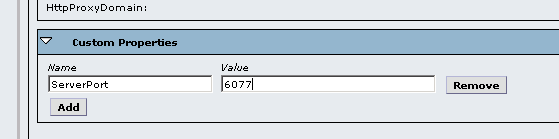
Many of those involved with Oracle Business Intelligence (OBIEE) know that a setting is configured when setting up the Informatica OEM component for the pre-built analytic applications.  Most of these implementers don’t bother to understand what is being accomplished when setting this specific custom property, ServerPort.  Regardless of the implementation or integration by accessing the Integration Service’s properties, and creating a Custom Property called ServerPort and assigning an available port value, the integration service when it starts up (or restarted after initial creation of this custom property) will be assigned this port value to listen.
Here are a few short steps to follow in order to configure and test so that you can see how it works and use on your next project.
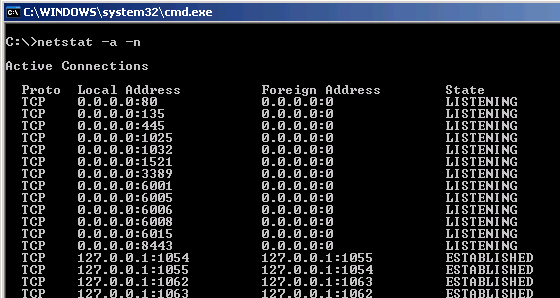
Run Netstat -a -n from a command prompt before configuring the custom property to see the random port your service is listening on.
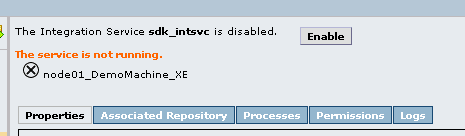
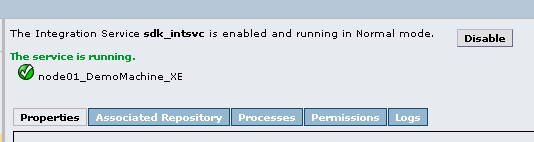
Assign the Custom Property and Available Port value and restart the Integration Service by disabling and enabling the Integration Service.
Run netstat -a -n to verify that your Integration Service is listening on the port you’ve configured with the Custom Property value for ServerPort.
Read More
Posted in Informatica | No comments

OBIEE 11g Pre-Requisites Kernel Failure

Posted on 07:39 by Unknown

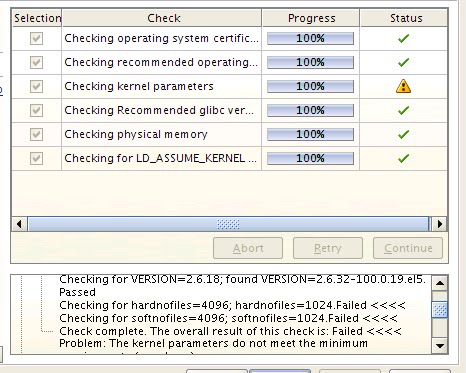
 install OBI 11g and during the pre-requisites check one of the sections fail, you choose to ignore it, and then a week later your OBI server goes down because you forgot to flip a switch or change a setting from the very beginning?  This post attempts to help alleviate that from becoming your fate by speaking to the only part of the OBIEE 11g pre-requisite on Linux that continually fails during my installations.  I’m speaking about the Kernel parameters pre-req check:
You can Google the hard/soft nofiles kernel parameters and their purpose because I will not explain it here.
Ultimately these configuration settings are stored in the /etc/security/limits.config file.  You will need to work your VI editor skills to add two lines for the linux user you are conducting the OBI 11g install with.  If you look at my screenshot below you see that I had previously updated this file for the “oracle” user.  That is the user that I used to install the Oracle 11gR2 RDBMS on that machine prior to my OBI 11g install.  Update the file similar to mine – at least meet the limit for which the pre-req check seeks.
Rebooting the machine is the easiest way I found to ensure the settings get impacted.  I’ve tried just refreshing (clicking the back button on the install wizard) the pre-req check while in-stride but that didn’t work after the change was made.  That left me with the quick reboot option which wasn’t a big deal in my environment.
After the machine came back up, I restarted the OBIEE 11g installation and as you can see below all pre-reqs passed at 100% which nice glowing green check marks.  The install continued and all was good.
Read More
Posted in OBIEE | No comments

OBIEE 11g on DHCP Assigned Network

Posted on 07:29 by Unknown

OBIEE 11g on a non-static IP or DSN network. Let’s say you’ve even got one or two rough VM Images up and running. Then one day perhaps after a W/LAN refresh your OBIEE 11g instance no longer boots up.  And you ponder to the stars, why might this be happening, and of course, How do I fix it?  Well if all things are equal and this is truly the case that the IP address for your server has changed you will need to check your WebLogic Server Admin Console for the answer.
The problem is that the WebLogic Server (WLS) actually holds on to the DNS or the IP address of the machine from which it was once originally booted up.  On subsequent boot attempts if the IP address or DNS does no resolve then you will have an issue getting your services up and running.
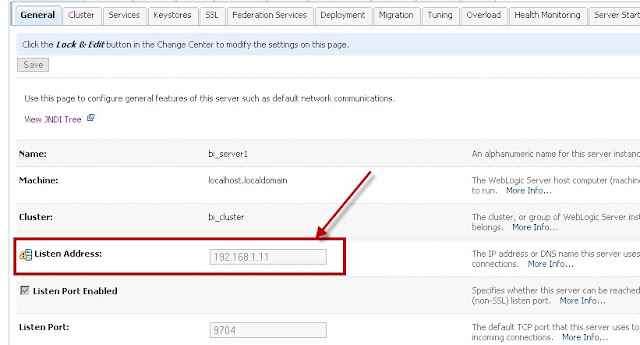
To resolve this issue, start up just your WLS Administration Console, which knows by default to depend on only resolving to the machine from which it is booted.  Navigate to Environments > Servers and locate your Oracle_BI server (bi_server1) Managed Server instance.  Click on it to go into the properties of the OBI managed server.  Under the Configuration > General tab structure locate the “Listen Address”.  Adjust the value in this field to make sure that this address is the same as the machine on which your instance is really running.  Or better yet enter a DNS (use the /etc/hosts file on *Nix or /driver/etc/hosts file on Windows if not on a big network).
Restart all related OBI 11g services or do a clean reboot if you are feeling saucy.  That should clear out the issue and allow your OBI 11g instance to boot up as intended.
For further notation, I would suggest always using a DNS for this field if possible.  Otherwise, if using a WLAN router or the sort, most routers have the ability to “assign” a specific machine with a specific dynamic IP address even on a refresh.  If your router (let’s say at your home office, etc.) has this feature that may be an option here.
Read More
Posted in OBIEE | No comments

OBIEE 11g - Linux User and Groups Setup for OBI11g Install

Posted on 07:28 by Unknown

Typically setting up the user base and groups for an install is rather straightforward.  Setting up the users and groups for OBIEE 11g on a Linux box is really no different.  I am attempting to use this post as a reference document so feel free to use it that was as well.  I foresee small changes and updates oto it over the next year so feel free to comment if you have conducted an install and noticed any variations are simpler methods.  Again, the initial user/group setup is really basic, I am just outlining some code here.
Check existing users by entering the following to see what already exists:
view sourceprint?
1.users
2. 
3.groups
Enter the following in a terminal window as “root” or similar privileged user.
view sourceprint?
01.groupadd oinstall
02. 
03.groupadd FMW
04. 
05.useradd -g FMW -G oinstall,FMW obi11g
06. 
07.passwd obi11g
08. 
09.mkdir -p /u01/app
10. 
11.mkdir -p /u01/FMW
12. 
13.chown -R obi11g:oinstall /u01/
14. 
15.chown -R obi11g:FMW /u01/FMW
16. 
17.chmod -R 775 /u01

Read More
Posted in OBIEE | No comments

OBIEE 11g - MDS or BIPLATFORM Schema Password Change Considerations

Posted on 07:04 by Unknown

As you know the OBI 11g installation requires that the Repository Creation Utility (RCU) be run in advance to create a metadata repository for information used by OBI.  During the installation of the RCU and the creation of the database users/schemas a password (or multiple depending on your install configuration) is created for the MDS and BIPLATFORM schemas.
Perhaps unknown by most, this password(s) ultimately becomes coveted by the OBI 11g system.  What if one needs to change the initial passwords for one or both of these schemas?  How would a password change or expiration of that user/schema password impact the OBI 11g system?
Let’s just say that this whole concept of using a metadata schema to support an application is not a novel one. However, because this concept is new to those who love and have made their bacon working with OBI this may seem cumbersome.  Although we had all better just get used to it.  It’s going to be around for a while according to the Oracle roadmap for BI.
A need to change the password for either schema or if the password just happens to expire (default expiration is set of Oracle RDBMS 11g) can beget some unexpected results.  There real question becomes what will happen to my OBI 11g system? and then of course where do I go to reset the password aside form the RDBMS itself so that OBI 11g picks it up and behaves itself? Fortunately the resolution/process is straightforward.

Can the MDS or BIPLATFORM schema password be reset?

Yes, of course it can. After all it is just a user/schema in your RDBMS.  It may even get locked due to the password expiration default setting of the Oracle RDBMS 11g database if using that version.  But once you change this for any reason that is where the fun begins.  The password can be changed using the basic Oracle PL/SQL syntax for updating a user account identified by…yada yada yada.  But once this is done it actually causes issues with the WLS and OBI system’s ability to connect to those schemas.  I’m guessing some encryption had taking place during the installation and it gets disrupted or something like that.  Either way both the MDS schema required by Fusion Middleware Control (EM) and the BIPLATFORM schema that controls the OBI Agents, etc. gets hosed.
Oracle 11g db seems to default to expiring a user’s password within a fairly short window.  Recently I was testing an old OBI 11g VM I had put together and when the Weblogic services didn’t start up properly the investigation and troubleshooting phase began.  Since the Weblogic and OBI 11g components rely on the two schemas for MDS and BIPlatform if a connection cannot be made to these schemas for any reason unexpected results will occur for your OBI 11g implementation. Ultimately the resolve was to update the user account with an unlimited password lifetime grant similar to the PL/SQL code below.  This code below simply sets the default profile with which a user/schema may be associated.
ALTER PROFILE DEFAULT LIMIT
FAILED_LOGIN_ATTEMPTS UNLIMITED
PASSWORD_LIFE_TIME UNLIMITED;

Impact of MDS or BIPLATFORM password reset

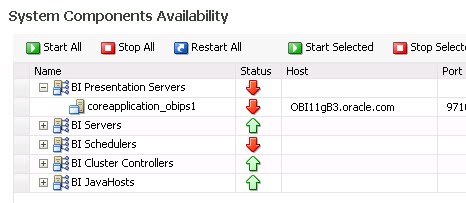
If one needs to adjust the password for these schemas or the password expires two things will happen.  First, the WebLogic Server (WLS) will startup but it will not start up properly. Viewing the start up logs one will notice an error stating that there is an invalid username/password as such the WLS cannot properly connect to the database.  This is the main culprit and should be rectified first (more on this below).  The second issue one will notice is a functional one that will show itself clearly in the OBI 11g fusion control enterprise manager (EM).  This has to do with the BI Scheduler service component.  One will notice that this will not start properly.  As a matter of fact it just won’t start.  In fact, it will may have an impact on other components such as the “Restart All” will not complete, etc.
The impact is clear and that nothing will work properly.

How-to Fix / Update the MDS schema password for OBI 11g?

Great question.  Here are the steps:
  1. Login to the Fusion Middleware Control (EM)
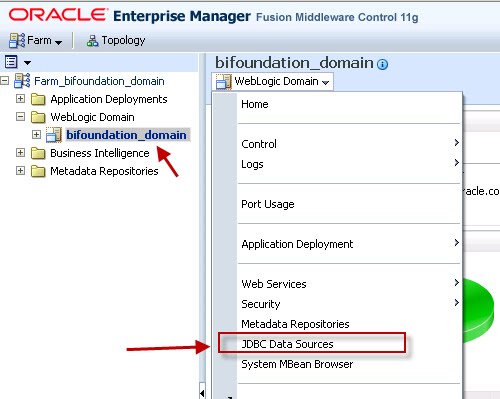
  2. Expand WebLogic Domain > bifoundation_domain
  3. Under the bifoundation_domain, expand the WebLogic Domain dropdown and select JDBC Data Sources
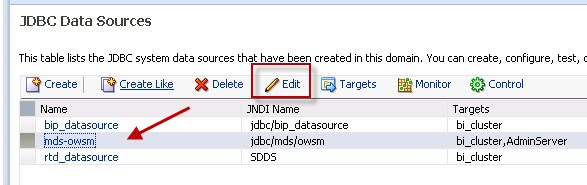
  4. Select mds-owsm from the list and click Edit
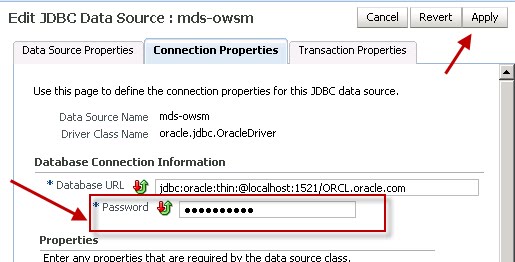
  5. Under the connection properties tab change the password and click the Apply button (upper right of form)
  6. Restart OBI Services

How-to Fix / Upate the BIPLATFORM schema password for OBI the 11g Scheduler?

Another good one friend.  Here are the steps:
  1. Login to the Fusion Middleware Control (EM)
  2. Expand Business Intelligence > coreapplication
  3. Click on the Deployment tab
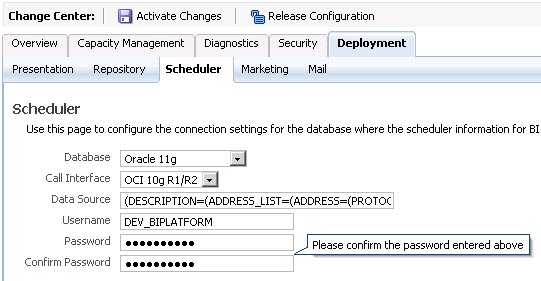
  4. Click on the Scheduler tab
  5. Click the Lock & Edit Configuration button
  6. Once the option to edit the scheduler metadata becomes available enter the new password for the schema/user
  7. Click Apply
  8. Click Activate Changes
  9. Just restart the scheduler. Or, bounce OBI Services just to be ready and steady if so desired.

Other Possible OBI 11g Symptoms from this or similar password expiration/change

  • SampleApp MapViewer obiee_navteq schema will cause maps to not render
  • May impact Action Framework to some degree
  • Will impact Real-Time Decisions (RTD) if installed

Conclusion

Clearly dealing with security constraints in OBI 11g becomes a new factor of your designated OBI Administrator. It is an extra task that I am sure one could do without.  However, this blog showed a quick approach to getting the core OBI 11g system back up and running in case this is a situation one gets placed into.  There are several other areas that require updating the password for in case the DB user password is changed at any point in time.  I left this post for the core pieces so that your EM capacity tab shows nothing but green up arrows. 
Read More
Posted in OBIEE | No comments
Newer Posts Older Posts Home
Subscribe to: Posts (Atom)

Popular Posts

  • [Informatica] Informatica Service is not Configured to run Impacted Session
    When I executed the informatica task using DAC, I got the below message despite the fact that all the sessions were refreshed and validated....
  • OBIEE 11g - MBean attribute access denied.
    I installed OBIEE 11.1.1.6.8 on my machine. Installation went fine and I could log in to the front end for the first time. When I   checked ...
  • OBIEE 11g - State: HY000. Code: 10058. [NQODBC] [SQL_STATE: HY000] [nQSError: 10058] A general error has occurred. [nQSError: 46118] Out of disk space. (HY000)
    Error Details Error Codes: AAD5E5X3:OPR4ONWY:U9IM8TAC Odbc driver returned an error (SQLFetchScroll). State: HY000. Code: 10058. [NQODBC] [S...
  • Informatica Powercenter Workflow Manager Repository Navigator docking float issue
    In case you’re also experiencing where your Repository Navigator is not dock or attached and it seems just floating within Workflow Manager ...
  • [OBIEE11g] - OBIEE Dashboard for Informatica Metadata Reporting
    The metadata that Informatica Power Center 8 retains in its repository can be exposed via OBIEE reports and dashboards. This metadata includ...
  • [OBIEE11g] - Drill Down to Sub Reports Passing Multiple Prompts Values
    People who are familiar with passing multiple parameter values to drill down reports using the GO-URL can now take a breath of fresh air. In...
  • OBIEE 11g not showing new dashboard in the drop down menu
    When creating New dashboard in  OBIEE 11g, I have faced with issue that dashboard name did not show up in drop down dashboard menu. 1. When ...
  • OBIEE 11g Hide/Show Sections based on Dashboard Prompt
    allow a user’s interaction to hide/show certain sections of a dashboard. In this particular case the user wanted to choose either ‘Quarterly...
  • [OBIEE11g] - Creating Dashboard Traversing Through Graph
    The general requirement asked for by customers is that they want to Click on the Main Dashboard Page’s Graph and be transferred to the other...
  • OBIEE 11g - Query Limit
    Query limit and number of minutes a query can run per physical layer database connection, follow the below steps. > Login to Repository u...

Categories

  • BI Publisher
  • DAC
  • DataWarehouse
  • Hyperion
  • Informatica
  • OBIEE
  • ODI
  • Oracle Applications EBS 12.1.3
  • Oracle Database
  • PL/SQL
  • SQL
  • Unix/Linux

Blog Archive

  • ▼  2013 (500)
    • ▼  November (8)
      • OBIEE11g - Custom BI Time Dimension Populate Datab...
      • OBIEE 11g - Enable Report Performance Improvement ...
      • OBIEE11g - Enable Log-Level from Advanced Tab
      • OBIEE11g - Calculating First Day of Year, Quarter,...
      • OBIEE11g - Changing Default Chart Colors
      • Error : [nQSError: 13015] You do not have the perm...
      • OBIEE 11g - Query Limit
      • OBIEE 11g - Query for Yesterday Date
    • ►  October (1)
    • ►  July (4)
    • ►  June (9)
    • ►  May (15)
    • ►  April (24)
    • ►  March (43)
    • ►  February (73)
    • ►  January (323)
Powered by Blogger.

About Me

Unknown
View my complete profile